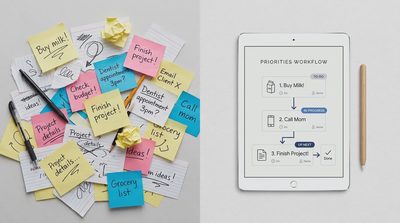


There is a particular kind of technology advice that sounds useful until you try to follow it.
Use AI to write every email. Use AI to plan every meal. Use AI to summarize everything you read. Use AI to make decisions, organize your calendar, manage your projects, and automate your daily routine.
Eventually, the advice becomes less about solving problems and more about finding new places to insert AI.
That is backward.
If you're wondering how to use AI in daily life, the most useful starting point isn't a list of 100 things an AI assistant can do.
It's a much simpler question:
Which parts of your day would genuinely become easier with AI—and which are already working fine?
AI can be an excellent tool for drafting, organizing, brainstorming, and exploring unfamiliar subjects. It can also produce inaccurate information, introduce privacy concerns, and turn simple tasks into complicated processes.
The difference often comes down to choosing the right job.
The Problem With Using AI for Everything
The appeal is understandable.
AI assistants can respond quickly, work with natural-language instructions, and help with tasks that once required specialized software or considerable manual effort.
When a tool is that flexible, it's tempting to use it everywhere.
But capability and usefulness are not the same thing.
A calculator can perform complicated arithmetic. That doesn't mean you need one to decide whether to make coffee.
Likewise, an AI assistant might be able to draft a two-sentence text message, but writing the message yourself may be faster and more personal.
Every AI-assisted task introduces its own steps:
Decide what to ask.
Explain the necessary context.
Review the response.
Correct mistakes or missing details.
Transfer the result into the place where it belongs.
For some tasks, those steps are worthwhile.
For others, they create more work than they remove.
The point of practical AI adoption should be to reduce friction, not to maximize the number of AI interactions in your day.
The Best Ways to Use AI Start With a Real Problem
Before adopting an AI tool, identify something you regularly find difficult, repetitive, or unnecessarily time-consuming.
Maybe you struggle to organize rough notes into a useful outline.
Perhaps you spend too long writing routine messages.
Or you need help understanding unfamiliar terminology before speaking with a professional.
Those are reasonable starting points because the problem exists independently of the technology.
The best ways to use AI generally involve tasks where it can provide a useful starting point without requiring complete trust in its output.
1. Turn rough thoughts into a useful first draft
AI can help organize scattered ideas into a structure.
Suppose you have notes for a community meeting, but they are out of order.
You could ask:
"Organize these notes into a short agenda. Keep the original meaning, group related items, and identify questions that still need answers."
The assistant may produce a clearer starting point.
You still need to check whether anything important was omitted or misunderstood.
But the organizing work may become easier.
2. Explore options before making a decision
AI can help you develop comparison criteria.
For example, you might ask it to identify the factors worth considering when choosing a home printer, planning a family trip, or evaluating software for a small team.
This can be useful when you don't yet know which questions to ask.
However, an AI-generated comparison should not be treated as verified evidence about current prices, product availability, or specific features.
Use it to structure your thinking, then check the details that matter.
3. Explain unfamiliar concepts in plain language
AI can help make technical or unfamiliar subjects more approachable.
You might ask for a beginner-friendly explanation of home network terminology, spreadsheet functions, or a concept mentioned in a document.
A useful follow-up is:
"Explain that again using a practical example, and tell me which parts are easy to misunderstand."
This can support learning, but important factual claims should still be checked against reliable sources.
For health, legal, financial, or safety-critical matters, AI explanations are not substitutes for qualified professional advice.
Creative Ways to Use AI Without Adding More Digital Clutter
[IMAGE 02 — INSERT HERE]

Some of the most interesting AI uses are modest.
They don't require complex integrations, paid automation platforms, or a complete overhaul of your digital habits.
Make a difficult task easier to start
Imagine you've been avoiding a household organization project because it feels overwhelming.
Instead of asking AI to design an elaborate productivity system, ask it to break the project into five manageable steps.
You can then decide which steps are realistic.
The value isn't that AI manages your life.
It's that it helps you move past the blank-page problem.
Practice a conversation
AI can help you rehearse a presentation, interview, or difficult conversation.
For example:
"Act as a skeptical audience member and ask me five reasonable questions about this presentation."
This can help reveal gaps in your explanation.
But AI-generated reactions are simulations, not reliable predictions of how a real person will respond.
Generate alternatives when you're stuck
AI can be useful for brainstorming dinner ideas from ingredients you already have, exploring different ways to organize a workspace, or finding possible titles for a personal project.
The results don't have to be perfect to be useful.
You are using AI to expand your options, not to make the final choice.
Create a checklist from your own instructions
If you already have a process written in messy notes, AI can help turn it into a checklist.
That can be useful for packing, event preparation, household maintenance, or routine work.
Review the checklist for missing steps, especially when the task involves safety or important deadlines.
The common theme is that AI helps with preparation.
You remain responsible for deciding what to do.
When AI Is the Wrong Tool
A technology tool can be impressive and still be unnecessary.
Here are several situations where skipping AI may be the more sensible choice.
When the task is already simple
If you need to set a timer, add a calendar event, or send a short message, your existing tools may already handle the job efficiently.
Adding an AI interaction can introduce unnecessary steps.
Use the simplest reliable method.
When accuracy is difficult to verify
AI can produce confident but incorrect answers.
If you cannot independently evaluate an important claim, relying on the response becomes risky.
This is especially relevant to medical decisions, legal obligations, financial choices, and technical instructions that could cause damage if followed incorrectly.
AI may help you prepare questions or understand terminology, but it should not replace appropriate expert judgment.
When the information is sensitive
Before uploading personal records, private correspondence, business documents, or information about someone else, consider whether sharing it is appropriate.
Different AI services and account configurations may have different data-handling arrangements.
Do not assume that every AI conversation is suitable for confidential material.
If you're uncertain about the privacy implications, avoid uploading the information until you've reviewed the relevant policies and permissions.
When human connection is the point
Some tasks are valuable because a person performs them.
A thoughtful note to a friend, a sensitive family conversation, or a personal expression of gratitude may lose something when fully delegated.
AI can help someone find words when they are struggling.
But convenience shouldn't automatically replace personal attention.
When maintaining the AI workflow becomes another job
An automation that requires constant troubleshooting may not be saving time.
If you need several services, complicated instructions, and repeated manual corrections to complete a small task, reconsider the design.
Sometimes a simple checklist is better than an elaborate AI workflow.
Ways to Use AI at Work Without Creating More Work

Workplace AI is often promoted as a way to automate entire processes.
That can be appropriate in carefully designed systems, but ordinary professionals may benefit more from smaller, controlled uses.
Drafting routine communications
AI can prepare a first draft of a non-sensitive email, meeting agenda, or internal announcement.
The person sending it should verify the facts, tone, and commitments.
Never allow a polished draft to make promises you haven't approved.
Organizing meeting notes
AI can help turn notes into a structured summary with possible action items.
But it may misunderstand who agreed to do what or turn a suggestion into an apparent commitment.
Check owners, deadlines, and decisions against the original notes.
Working with spreadsheets
AI can suggest formulas, explain functions, or help troubleshoot a spreadsheet problem.
Test proposed formulas on sample data and verify results before using them in important calculations.
Preparing research questions
AI can help identify topics to investigate, comparison criteria, or gaps in a preliminary plan.
It is less reliable as an unquestioned source of current facts.
For decisions that depend on recent information, verify claims using authoritative sources.
Improving an existing process
Instead of asking AI to automate your entire job, describe one repetitive task and ask for several ways to simplify it.
The best answer may involve AI.
It may also involve changing a template, removing an unnecessary approval step, or using a feature in software you already own.
A useful AI assistant should help you recognize when AI isn't needed.
A Simple Framework: Should You Use AI for This?
Before adding AI to a task, evaluate four things.
Question | Why it matters |
|---|---|
Is the task repetitive or difficult to start? | AI may reduce preparation effort |
Can I verify the result? | Unchecked errors can erase the benefit |
Is the information appropriate to share? | Privacy and confidentiality matter |
Will AI reduce total effort? | Faster generation doesn't always mean faster completion |
Consider a few examples.
Writing a first draft of a routine agenda: Often a reasonable use, especially if you can review it quickly.
Choosing a medical treatment: AI may help explain terminology or prepare questions, but treatment decisions require qualified medical guidance.
Organizing a personal grocery list: AI is optional; a simple notes app may be easier.
Summarizing a lengthy non-sensitive document: Potentially useful, provided you verify important conclusions against the source.
Sending an emotionally sensitive message: Human judgment and personal attention should lead, even if AI helps with wording.
This framework isn't about being for or against AI.
It's about matching the tool to the consequences of the task.
The Hidden Cost of AI: Reviewing the Output
One of the least discussed parts of AI productivity is the work that happens after the response appears.
AI can produce a detailed answer in seconds.
But if the answer contains invented details, missing context, or misleading recommendations, checking it may take longer than doing the task manually.
That doesn't make AI useless.
It means review time belongs in the productivity calculation.
A practical AI workflow has three stages:
Prepare → Generate → Verify
First, define the task clearly.
Next, let AI produce the part it can handle.
Finally, review the output at a level appropriate to the risk.
For low-stakes brainstorming, a quick judgment may be enough.
For consequential work, verification and human approval become much more important.
The right amount of oversight depends on what could go wrong.
Don't Confuse Using AI With Learning a Skill
AI can help you learn.
It can explain concepts, offer practice questions, and provide feedback on your reasoning.
But having AI perform every difficult step can also reduce your opportunities to practice.
If you want to become a better writer, occasionally write without assistance.
If you're learning spreadsheets, make sure you understand the formulas rather than simply copying them.
If you're developing a new professional skill, use AI to explain and challenge your thinking, not automatically replace it.
This doesn't mean you should avoid helpful tools.
It means distinguishing between tasks you want to finish and abilities you want to develop.
Sometimes the effort is part of the value.
Start With One Useful AI Habit
If you're new to AI, resist the temptation to rebuild your entire digital life around it.
Choose one recurring task where assistance might help.
For example, you could use AI to organize a weekly set of non-sensitive notes into a short action list.
Try the process a few times.
Then ask:
Did it save meaningful time?
Was the result accurate enough to use after review?
Did it reduce mental effort?
Did it create new privacy or maintenance concerns?
Would I still choose this method on a busy day?
If the answers are encouraging, keep the habit.
If not, change the approach or stop using AI for that task.
You don't need to justify a tool simply because it is popular.
Frequently Asked Questions
How can beginners use AI in daily life?
Start with low-risk tasks such as brainstorming ideas, organizing non-sensitive notes, drafting outlines, or explaining unfamiliar concepts. Review important details and avoid sharing sensitive information without understanding the service's data practices.
What are the best ways to use AI at home?
AI can help with planning, learning, writing drafts, generating options, and simplifying routine information. The best uses are those that solve an existing problem without adding unnecessary complexity.
What are some creative ways to use AI?
Try practicing a presentation, generating questions for a discussion, exploring alternatives for a project, or turning your own rough instructions into a checklist. Treat outputs as suggestions rather than guaranteed facts.
Should I use AI for every task at work?
No. Consider the task's sensitivity, accuracy requirements, consequences, and total effort. AI can help prepare work, but human review remains important, particularly for external communication and consequential decisions.
Use AI Where It Earns Its Place
AI is useful because it can help people do certain things more easily.
It is not useful simply because it can be inserted into another process.
The best approach is selective.
Use AI when it helps you get started, organize information, explore options, or reduce repetitive work.
Skip it when the task is already simple, the information is too sensitive, the result cannot be verified, or human attention is part of what makes the task valuable.
You don't need to use AI for everything to benefit from it.
You need to use it for the things that genuinely make your life easier.