Most laptop advice starts with processor tiers, benchmark scores, and the newest AI chip. That works if you are shopping for a product launch. It does not work if you are helping a real person who already has a job, a family, a budget, and limited patience for technology that creates more work than it removes.
I spent nearly a decade as a senior product manager in Silicon Valley. I watched teams celebrate feature launches while ordinary users quietly dealt with the maintenance, notifications, and costs that came after. When someone now asks me whether a laptop is worth recommending, I ignore the marketing stack and ask a different question: Will this machine reduce friction in daily life, or will it add more?
Bottom line: Before I recommend any laptop to a real person, I look for five things—daily-use fit, total cost of ownership, setup and maintenance load, privacy and sharing practicality, and evidence that it still feels useful after 30 days. Specs matter only after those questions are answered.
The Five Things That Actually Matter
1. Daily Use, Not Launch Specs
A laptop earns its place by how it behaves on a Tuesday afternoon, not by the press release on launch day.
I start by matching the machine to actual weekly life. Here is the practical floor I use in 2026:
Primary Use Case | RAM (practical floor) | Storage (practical floor) | Screen Priority | Other Must-Haves |
|---|---|---|---|---|
Browsing, email, documents, video calls | 16 GB | 512 GB SSD | Readable brightness, 1080p+ | Decent webcam, quiet operation |
Remote / hybrid work | 16–32 GB | 512 GB–1 TB | Bright, low-glare, 16:10 preferred | Good keyboard, ports or dock support |
Student / light creative | 16 GB | 512 GB | Comfortable for long reading | Battery that lasts a full school day |
Heavy multitasking or light creative | 32 GB | 1 TB | Color-accurate if editing | Sustained performance without loud fans |
Notes I always share:
8 GB still works for very light use, but it starts feeling tight once multiple apps and browser tabs stay open.
256 GB storage fills up faster than most people expect once the operating system, apps, and a few photo libraries land.
The processor and graphics card only matter after these daily-use pieces are settled. An impressive chip that forces constant thermal throttling or a loud fan in a quiet home office is not a win.
2. Total Cost of Ownership

The sticker price is only the first payment.
I run a rough four-year picture. A simplified example for a typical $1,000–$1,400 laptop looks like this:
Cost Category | Rough 4-Year Estimate | Why It Matters |
|---|---|---|
Laptop purchase | $1,000–$1,400 | The number everyone focuses on |
Accessories (sleeve, dock, etc.) | $50–$200 | Easy to forget until you need them |
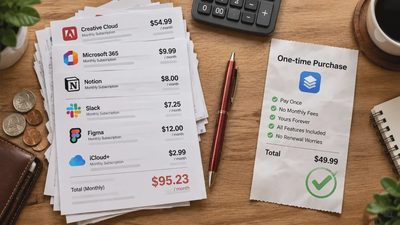
Software / subscriptions | $0–$300 | Depends on what you already own |
Repairs or battery replacement | $100–$250 | More likely on sealed, non-repairable designs |
Time spent setup + troubleshooting | Hard to price, but real | Evenings and weekends you will not get back |
Early replacement risk | Variable | Cheap machines that fail early cost more overall |
Business analyses often show hardware is less than half of true multi-year cost once support and downtime are counted. For a household the numbers are smaller, but the principle stays the same: a cheaper machine that needs early replacement or constant fiddling can cost more than a slightly more expensive one that simply works.
I also ask whether the person already owns external storage, a good monitor, or a docking station. Buying a laptop that forces them to replace those items raises the real price.
3. Setup and Maintenance Friction
The feature is easy. Living with it is the test.
Before recommending, I want clear answers to these questions:
How long does the initial setup take for a non-technical person?
Are accounts, backups, and basic security settings straightforward?
Does the manufacturer ship a clean operating system or a pile of trial software that needs to be removed?
How easy is it to keep the machine updated without constant interruption?
When something breaks, is repair realistic, or is the device effectively disposable?
I favor machines that can be set up in an evening and then largely ignored. I am skeptical of devices that require regular “optimization,” constant driver updates, or specialty knowledge just to stay usable.
Repairability matters more than most marketing admits. A laptop that can have its battery or storage replaced by a competent shop (or a careful owner) has a longer useful life than one that is glued shut.
4. Privacy and Family Sharing
A laptop that is awkward to share or hard to secure creates friction for the whole household.
Question | What Good Looks Like | Red Flag |
|---|---|---|
User accounts / family profiles | Simple separate accounts without advanced setup | Complicated workarounds or shared logins only |
File privacy while sharing | Easy to keep personal folders private | Everything defaults to shared or cloud-forced |
Webcam & microphone controls | Obvious physical or software switches | Buried in menus or hard to disable |
Data collection pressure | Clear choices, not constant prompts | Hard to refuse cloud accounts or tracking |
For families, the ability to create a simple, separate account for a child or spouse without advanced configuration is a practical requirement, not a nice-to-have.
5. The 30-Day Rule

I almost never treat a first-week impression as final.
The 30-day rule is simple: use the machine for real work and real life for a full month before deciding it is essential. In that time the novelty fades, the small annoyances surface, and the true daily cost becomes visible.
When I evaluate a laptop myself, I look for these signs after 30 days:
Does it still feel fast enough with a normal week of open apps?
Has the battery settled into a predictable pattern?
Are there recurring software or driver issues?
Would I still choose it if I had to buy it again with my own money?
If the answer is no, I do not recommend it—regardless of how impressive the launch coverage was.
Who This Approach Is For / Who Should Ignore It
This way of evaluating laptops works well for:
Families and professionals who want a machine that simply works for several years
People who already feel overloaded by devices and subscriptions
Buyers who value predictability and lower maintenance over cutting-edge specs
It is less useful if you:
Need maximum performance for gaming, heavy 3D work, or professional video production and are willing to accept the noise, heat, and cost that come with it
Enjoy frequent upgrades and treat technology as a hobby rather than a tool
Already know exactly which high-end configuration you need and are shopping for the latest generation
In those cases, specialized reviews focused on benchmarks and sustained load are more relevant than this framework.
A Simple Pre-Recommendation Checklist
Before I say yes to any laptop recommendation, I run through this short list:
1. What does this person actually do with a computer in a normal week?
2. Does the configuration clear the practical floor for that use (RAM, storage, screen, battery)?
3. What is the realistic four-year cost, not just the purchase price?
4. How much setup and ongoing maintenance will this create?
5. Can privacy and sharing be handled simply by the people who will use it?
6. Is there reason to believe it will still feel useful after 30 days of real life?
If any answer is unclear or negative, I hold the recommendation.
Make the Technology Earn Its Place
A laptop is not a trophy. It is a tool that should make ordinary days a little easier and then get out of the way.
When I recommend one, I am not trying to pick the “best” machine on a leaderboard. I am trying to match a real person’s actual life with a device that reduces friction instead of adding more decisions, more cost, and more maintenance.
That is the only test that matters.
If you are currently deciding whether a particular laptop is worth bringing into your household, start with the five questions above. Specs can wait until the daily reality is clear.